
You'll learn to
- Explain what a location program is and which customers need one
- Describe zones, triggers and manual cues and how they interact
- Explain how a display gets its position, including serving it from one device to others
- Say what location programs don't do yet
Say a tour boat wants its displays to show the story of each landmark as the boat passes it. That's a location program. It drives a display from where it is rather than from a clock, so as the vehicle moves, the content changes with it. It's the feature that makes Signage work for tour and transport operators.
It's one of the four kinds of content a display can hold, alongside a playlist, a schedule and a media item. Every display running one needs a Signage - Standard license.
Location programs live in the project's Locations tab. See Location programs: an overview.
Picture the Happy Pedals van on a downtown run. While it's inside the downtown zone, the onboard loop plays. Zones are the background, and that zone's content loops for as long as the van is inside it.
As the van passes the Rideau Canal Locks, a trigger fires on its own and interrupts the loop. When the driver presses the safety briefing button, a manual cue interrupts it the same way. When either finishes, the zone is worked out fresh, because the van has moved while the clip played.
A program-wide setting, When a trigger interrupts, decides what a trigger does if something is already playing. The default is Skip the trigger. Cues always replace what's playing, whatever that setting says, because a button that does nothing looks broken.
Zones cover an area
- Polygons or circles on the map
- Each plays a playlist, a media item or a live map
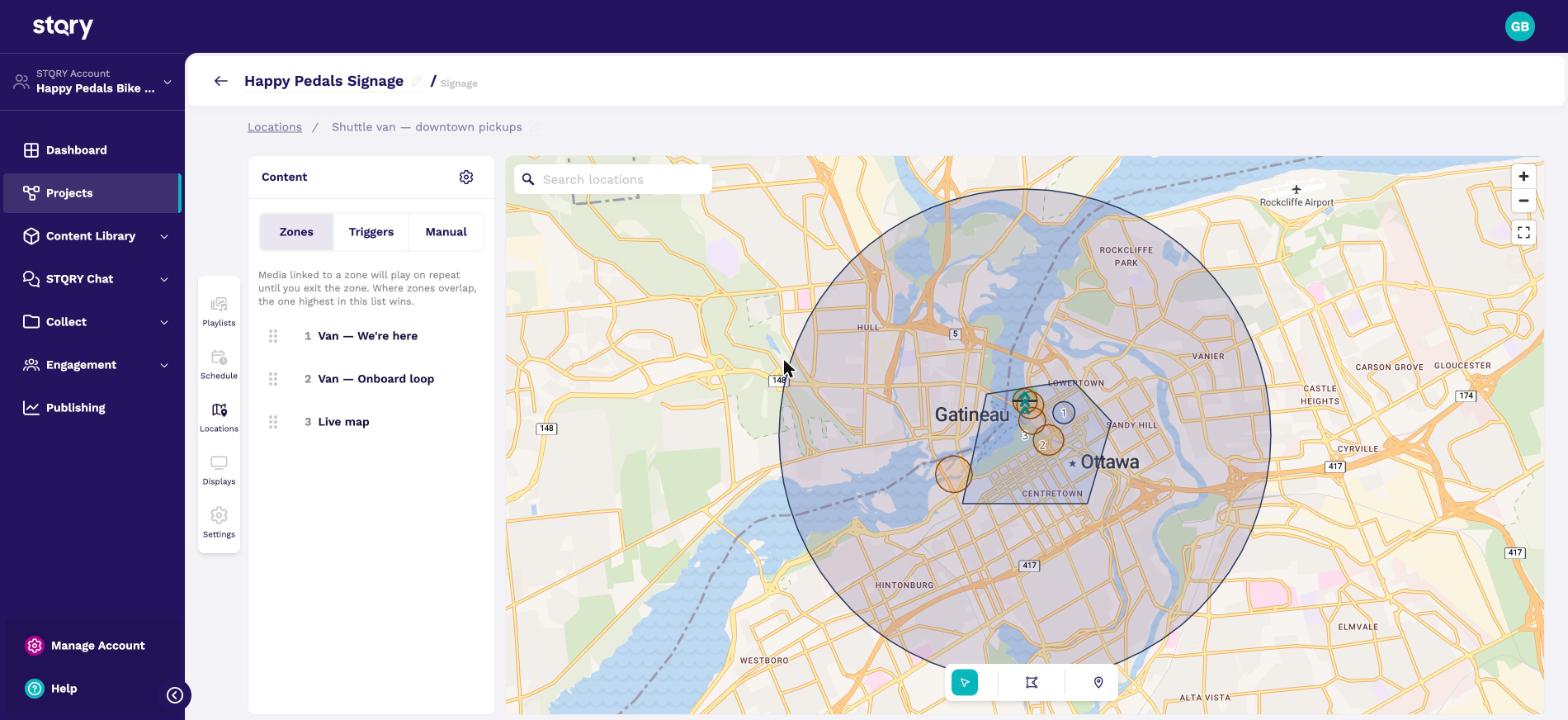
Zones are polygons or circles drawn on the map. Each one plays a playlist, a media item or a live map showing the vehicle's position.
The Happy Pedals van has three. A small circle at the shop forecourt says We're here. A polygon over downtown plays the onboard loop. A 4 km circle catches everything else and shows a live map.
Where zones overlap, the one highest in the list wins, so specific zones go above general ones. Outside every zone the display goes blank. That's why the van has a large catch-all zone, the live map, at the bottom of its list. See Location programs: zones and live maps.
A trigger fires a piece of content when the display passes a point. The Happy Pedals van has five, at landmarks like the National War Memorial and the Royal Canadian Mint. The Mint trigger has a bearing, so it only fires in one direction of travel.
The cooldown, 120 seconds, stops a vehicle crawling along a boundary from firing a trigger over and over. See Location programs: triggers.
The radius has to suit the vehicle's speed and how often the display gets a position. Take a coach doing 60 km/h past a 50 m trigger, with a position every 10 seconds. It misses the trigger most of the time. Widen the radius or shorten the poll interval.
Buttons for the driver
- Cues for moments with no fixed place
- The driver's tablet runs in Controller mode
- Players poll it for cues
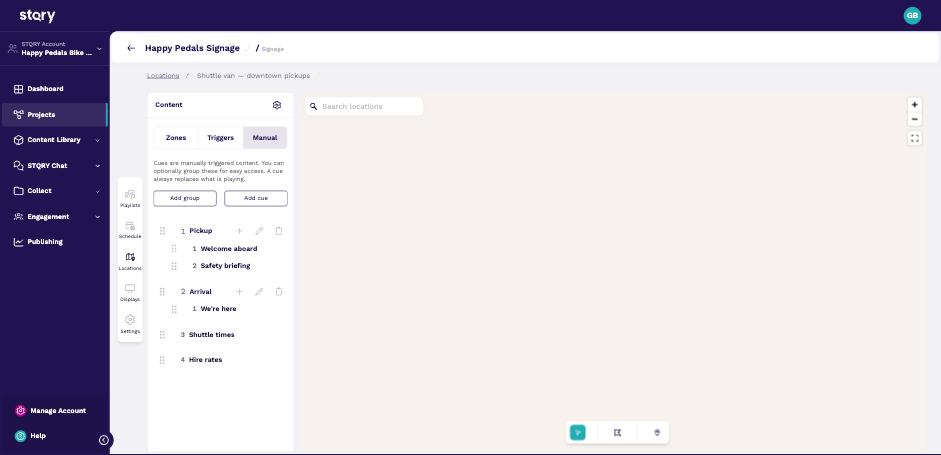
Some parts of a trip don't happen at a fixed place, like the welcome or the safety briefing. Manual cues are buttons for those. Groups nest one level deep. A cue or group with no content is hidden from the driver.
A display in Controller mode shows those buttons instead of content. The Happy Pedals van driver has a controller tablet, and the passenger display is a player. The driver also gets Stop, Blank screen and a switch to arm or disarm triggers.
Each player polls the controller for cues. Set the player's Cue source to Poll a controller and copy the URL the controller shows. The player's poll interval must be shorter than the shortest cue, or it can miss one. See Location programs: manual cues and controller mode.
How does a display know where it is?
| Location source | For |
|---|---|
| On device | Phones and tablets with GPS |
| Poll a server | Fire TV, Windows |
| None | The default, so the display stays black |
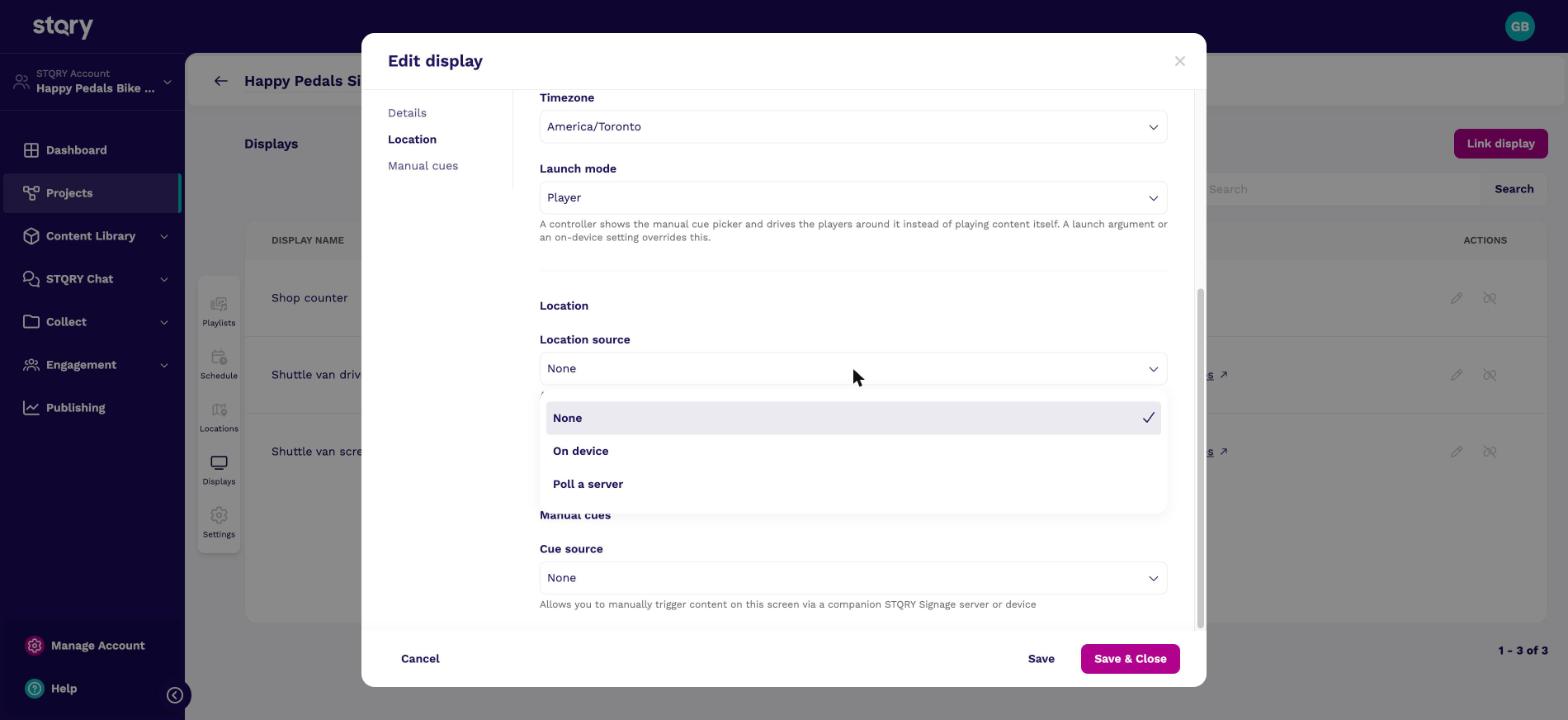
Every display running a location program needs a Location source on its record. Phones and tablets have GPS and can use On device. Fire TV Sticks, Android TV boxes and Windows PCs don't, so they use Poll a server and fetch a position over the vehicle's network.
New display records default to None. A display with a location program and a None source stays black, with no error and no message. When a customer calls about a new vehicle install that shows nothing, check this first. See Set a display's location source.
The standard vehicle setup is one GPS tablet with Serve this position to other displays turned on, feeding every passenger display. In the Happy Pedals van, the driver's tablet serves its position and the passenger display polls it.
What location programs don't do yet

- The audio companion doesn't follow a location program yet
- Zones have no time-of-day rules
- No position, no content
A tour operator may ask whether passengers can hear the commentary on their own phones. Not yet. The audio companion plays a display's audio on a visitor's phone, but it doesn't follow location programs. GPS-triggered audio to passengers' own phones is on the roadmap. Don't sell it as available today. Commentary through the vehicle's displays and speakers works now.
A zone is pure geography, with no time rules. To vary content by place and time, build the variation into the playlists.
Without a position fix, nothing plays. The display shows "Waiting for a location fix" while it waits, and the live map's basemap is downloaded in advance so it works at sea or in a tunnel.
- Fire TV Sticks have no GPS. Put one tablet with GPS on board and turn on Serve this position to other displays. Set each stick's location source to Poll a server, pointed at the tablet.
- The display's Location source. It defaults to None, which leaves the display silent and black. Then check the display isn't outside every zone.
- Not yet. The audio companion doesn't follow location programs. Triggers can play commentary through the vessel's own displays and speakers today.