
You'll learn to
- Explain what a customer does in STQRY Builder and what the app on the display does
- List the five things a Signage setup is made of, and the four kinds of content a display can show
- Explain the difference between Signage - Basic and Signage - Standard
- Say which hardware we support and which we don't
STQRY Signage is digital signage made for visitors. There are two parts to it, and most customer questions get easier once you know which part they're about.
Say a museum wants a welcome loop on a display in its lobby. Someone on their team logs into STQRY Builder, uploads the images and videos, and tells that display what to play. Builder is also where they build playlists, schedules and location programs.
The display itself runs the STQRY Signage app. It's installed once and connected to the account, and from then on it takes its instructions from Builder. Nobody needs to touch it again.
The two talk over the internet. When the museum changes its loop in Builder, the lobby display picks it up within about five minutes. If the network drops, the display keeps playing what it has cached.
What is STQRY Signage? is the customer-facing version of this module.
Who are Happy Pedals?
- Our demo app: a bike rental shop
- Shop counter: a schedule through the trading day
- Shuttle van: a location program that follows the van
Happy Pedals Bike Shop is the demo account we use throughout this course. It's a bike hire shop in Ottawa, and it has the two setups Signage is built for.
The Shop counter display sits in one place and runs a schedule. It shows rates and routes in the morning, tours and the shuttle at midday, and returns in the evening. A welcome loop fills every gap.
The Shuttle van collects riders from downtown hotels. Its passenger display runs a location program, so what it shows depends on where the van is. A tablet in the cab runs in controller mode, giving the driver buttons for the safety briefing and the welcome.
When you demo Signage, pick the one that looks like the customer. A gallery or visitor centre looks like the shop counter. A tour boat or a coach looks like the van.
Every Signage setup is made of these five things. Happy Pedals has all of them.
A display shows exactly one of four things. It can be a single media item, a playlist, a schedule or a location program. Schedules and location programs can hold playlists or media items directly, so a customer doesn't need a playlist for a single video.
The slides on Happy Pedals' displays are media items. They live in the account's Content Library, so the same slide or video can be reused across projects. Everything else lives inside a Signage project, which has a tab for each: Playlists, Schedule, Locations, Displays and Settings.
The shop's morning playlist is an ordered list of images and videos that loops. The counter's schedule places playlists on a calendar, so the morning loop and the evening loop are different. The van's location program changes content based on where the van is. That's what makes Signage work on boats, buses and shuttles.
Each display has a record in Builder. It carries the display's name, timezone, license and exactly one piece of content. We'll spend a module on each of these.
A display is given one piece of content at a time. It can be a playlist, a schedule, a single media item or a location program. You don't layer them.
That's worth keeping in mind when a customer describes what they want. Say a visitor centre wants its tours showing in the morning and its gift shop in the afternoon. That's a schedule with two playlists inside it, never two playlists on one display. If they want different content in different places, that's a location program.
How do I get to STQRY Signage in Builder?
- A new project type: Signage
- In the Beta Builder at beta-us.stqry.com
STQRY Signage is a new project type in STQRY Builder, and it's available in the Beta Builder. Send customers to beta-us.stqry.com. It redirects to the right region for their account, so it works wherever they are.
In Builder, the customer creates a project and picks Signage as the type. All their Signage work happens inside that project.
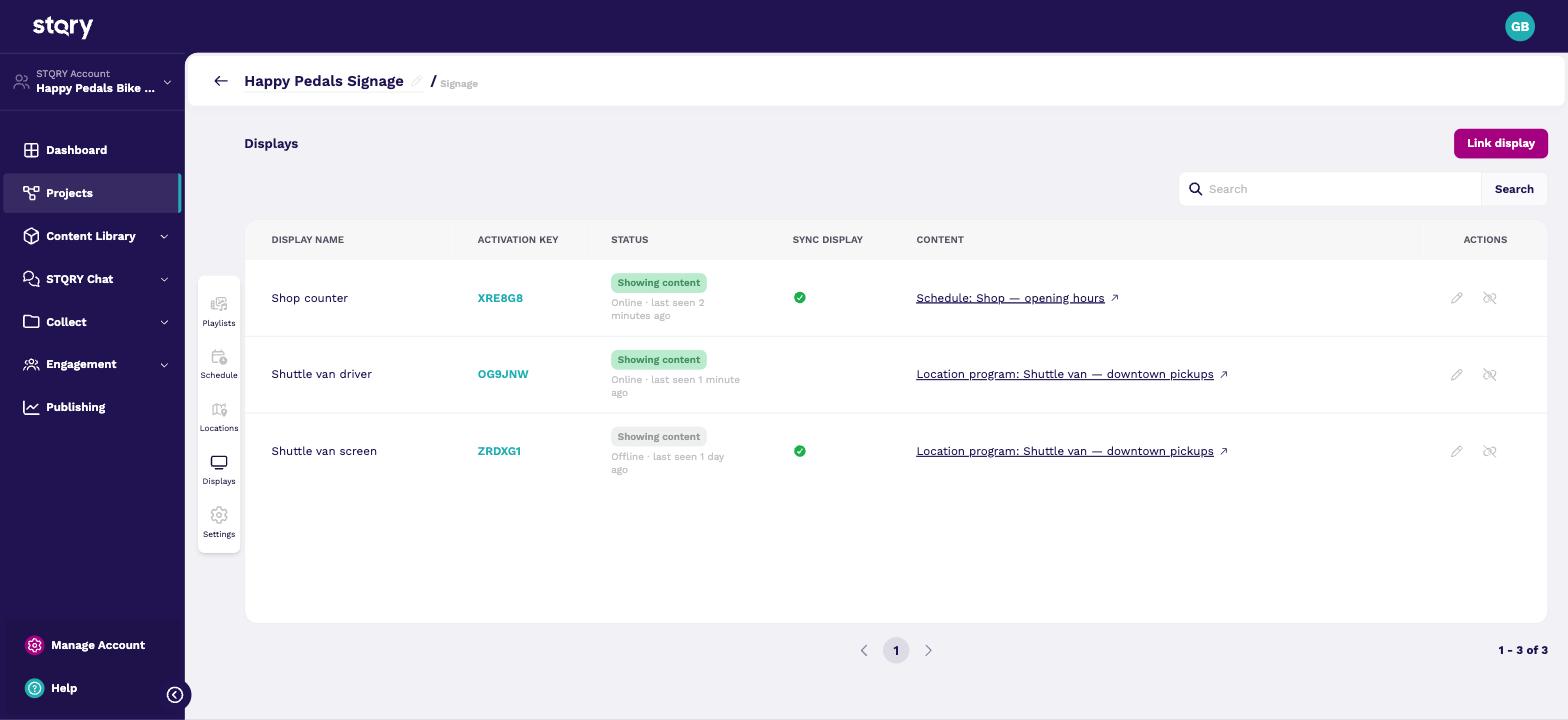
A Signage project has tabs for Playlists, Schedule, Locations, Displays and Settings. Here's Happy Pedals' project, open on its Displays tab. The shop counter is assigned a schedule, and both van displays are assigned the van's location program.
The Content column links straight to whatever each display is assigned. See Assign content to a display.
Each display uses one license from the account's pool. Which one depends on whether the display moves.
| Basic | Standard | |
|---|---|---|
| Per display, per month | $7 | $15 |
| Playlists, schedules, languages, sync, themes, audio companion | Yes | Yes |
| Location programs, controller mode, serving position | No | Yes |
Picture a gallery with three displays on its walls. They stay put, so Signage - Basic is all it needs. Basic includes everything except the location-aware features. A tour boat is different. Its displays move, so it needs Signage - Standard, which adds location programs, controller mode and serving a position to other displays.
The first display is free on either tier, for as long as the customer uses it, even when it's their only display. They don't need a paid STQRY Builder plan. We're trying Signage as a freemium product, so one gallery or one vessel can run Standard free. Customers add licenses once they've seen it work. Customers buy more licenses self-serve from the billing page at list price. A CSM handles multi-site and fleet deals, and Enterprise is "contact us".
Don't confuse the activation key with the license. The activation key identifies a display, and the license pays for it. See License types and what each includes.
When a museum asks what to buy for a new lobby display, start with a Fire TV Stick or an Android TV box. They're the cheapest way to turn a TV into a display, and both restart into the app after a power cut. A Fire TV needs Fire OS 7 or 8. Signage installs from each platform's own app store, and the browser build runs on anything with a current browser.
The browser build is a supported fallback for hardware none of the apps will run on. It doesn't relaunch itself after a power cut, so an installed app is better wherever one will run.
We don't support Tizen, webOS, BrightSign, Raspberry Pi or Apple TV yet, and newer Fire TVs running Amazon's Vega OS don't run the app. A customer with a commercial panel can drive it from a Fire TV Stick or an Android TV box on its HDMI input.
Say a museum already has a wall of Samsung panels, or an AV integrator's spec calls for BrightSign players. Don't say no. Post it in #product-knowledge on Slack and bring in the product team, because we can most likely add support. Check with them before you promise a date.
- A schedule, with the two playlists placed in it as time blocks. A display holds one piece of content, so two playlists can't both be assigned to it.
- The activation key is the six-character code that identifies a display. The license is the paid entitlement the display uses from the account's pool.
- BrightSign isn't supported yet. Post it in #product-knowledge, because we can most likely add support. In the meantime, a Fire TV Stick or Android TV box on the panel's HDMI input works today. It costs less than a player box, too. For a moving vehicle they'll also want Signage - Standard.