You'll learn to
- Describe the places STQRY Signage does best
- Name our competitors and how we're different
- Answer the questions customers push back with
- Recognise when it's the wrong fit
On board a tour boat or bus
- A live map most of the time
- A welcome loop in the harbour
- The right content at each landmark
- A Safety briefing button
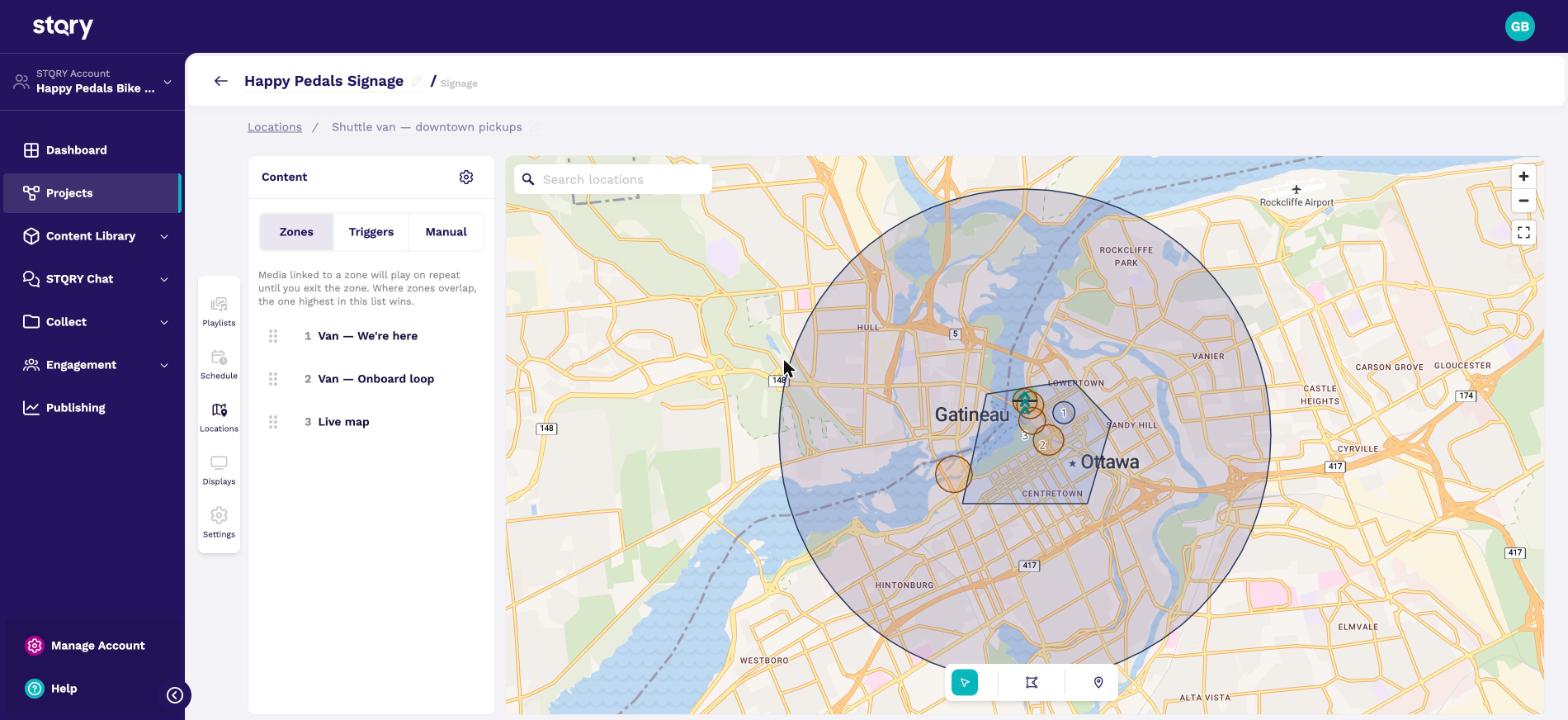
On a vehicle, a location program does the work. Say a tour boat is tied up in the harbour. The displays play a welcome loop. Once it's under way they show a live map, and as it passes each landmark they switch to the content for that spot.
The driver has one button for the safety briefing.
The screenshot is the Happy Pedals shuttle van program, with its zones drawn on the map.
Southern Discoveries, a Queenstown and Milford Sound operator, is our reference customer for this. You can name them in conversations.
In a museum or attraction

- Schedules for the ticket office and lobby
- The same content in every language
- Audio on the visitor's own phone
Say a museum wants its lobby display to change through the day. A schedule shows opening hours in the morning, events in the afternoon, and a closing message at the end of the day.
The audio companion lets visitors scan a QR code and listen on their own phone. It works with playlists and schedules. It doesn't follow location programs yet, so don't promise phone audio on vehicles. That's on the roadmap.
At a museum or attraction, you'll usually come up against general signage products like Yodeck, OptiSigns or ScreenCloud. They're good at office displays and menus. They have nothing location-aware, and no link to the customer's visitor content.
With tour operators, the competition is often nothing at all. Otherwise it's an audio commentary system like Nubart MOTION or Audiotours TourMaster. Those do audio, not displays.
Bloomberg Connects, Cuseum and Smartify come out of the same budget, but they're visitor apps, not signage.
Here's how they compare.
| Competitor | Price per display | How we're different |
|---|---|---|
| Yodeck | Free for one, then $8 to $16 | Nothing location-aware |
| OptiSigns | $10 to $45 | Nothing location-aware |
| ScreenCloud | $20 to $30 | No visitor content |
| Nubart | Annual licence | Audio only, no displays |
The full research is in docs/products/stqry-signage/POSITIONING.md.
"Yodeck is $8 and has a free tier." Our free display is the full plan, not a cut-down version. And Yodeck has nothing location-aware.
"Our vehicles have no GPS." That's fine. One phone or tablet on board shares its position with every other display.
"Does it work offline?" Yes. Content and maps are cached on the device, and displays keep time from their own clock.
"Why are there no transitions?" They haven't been built yet, so items cut straight from one to the next for now. If transitions matter to a customer, post it in #product-knowledge on Slack.
STQRY Signage is made for visitors. If a company wants displays in the staff room for announcements, or a dashboard of business figures, a general signage product will suit them better.
Staff news and dashboards are the one real mismatch, as the last slide said. Most other gaps aren't reasons to walk away. Transitions, display groups and per-item volume haven't been built yet. If a customer needs one of them, find out what they're trying to do first. Then post it in #product-knowledge on Slack and bring in the product team.
We support Fire TV (Fire OS 7 and 8), Android TV and tablets, Windows, iPad and iPhone, Mac, and any browser. We don't support Samsung Tizen, LG webOS, BrightSign, Raspberry Pi or Apple TV yet. If a customer or an AV integrator's spec needs one of those, post it in #product-knowledge on Slack and bring in the product team. We can most likely add support.
Newer Fire TV devices running Vega OS aren't supported either.
Our free display is the full plan, the content comes from what they already build in STQRY Builder, and Yodeck has nothing location-aware.
No. The audio companion works with playlists and schedules today. Location-triggered phone audio is on the roadmap.
BrightSign isn't supported yet. Post it in #product-knowledge, because we can most likely add support. Fire TV, Android TV and Windows work today.